Descargar enlaces:
ES File Explorer/Manager PRO Mod APK 1.1.4.1 [Quitar anuncios,Desbloqueado]
rápido Descargar
Descargar
* Todos los mods apk son cargados por los usuarios. Si hay alguna infracción, envíe
contáctenos para eliminarlo.
Funciones de modificación:
Anuncios Eliminado
Patrocinado banner diseño eliminado
Todos los anuncios de llamadas de actividad eliminado
Todos los anuncios de banner de diseño en el modo tablet eliminado
Nativo de admob anuncios de banner diseño eliminado
Lockscreen anuncios de tamaño para 0
Monitor en Tiempo Real desbloqueado
Selector de Tema desbloqueado
Sistema de archivos ocultos desbloqueado
Forzada de inicio página de anuncios desactivado
Don icono eliminado de Es Deslizar el dedo
Google Analytics desactivado
ES File Explorer/Manager PRO Mod APK Info
ES File Explorer/Manager PRO Introducción a la aplicación
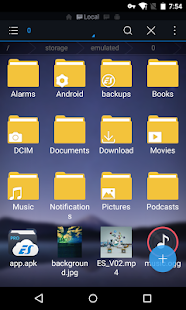
ES File Explorer/Manager PRO es una aplicación poderosa y eficiente que te permite administrar y explorar todos los archivos y carpetas en tu dispositivo Android. Esta versión PRO ofrece características adicionales y está libre de anuncios.
Esta aplicación es esencial para aquellos que necesitan organizar y acceder fácilmente a sus archivos. Te permite cortar, copiar, pegar y eliminar archivos y carpetas de manera sencilla. Además, puedes comprimir y descomprimir archivos en diferentes formatos, como ZIP y RAR.
ES File Explorer/Manager PRO también te permite acceder a archivos en la nube, como Dropbox, Google Drive y OneDrive, lo que facilita el almacenamiento y la sincronización de tus documentos y archivos importantes.
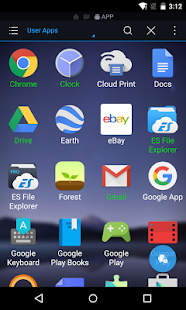
Además, esta aplicación cuenta con un gestor de aplicaciones integrado, lo que te permite instalar y desinstalar aplicaciones de manera eficiente. También puedes realizar copias de seguridad de tus aplicaciones y restaurarlas cuando sea necesario.
Una de las características más destacadas de ES File Explorer/Manager PRO es la capacidad de acceder a archivos en redes locales. Puedes conectar tu dispositivo a computadoras y otros dispositivos en tu red y transferir archivos de forma rápida y segura.
En resumen, ES File Explorer/Manager PRO es una herramienta completa para administrar, organizar y explorar tus archivos en tu dispositivo Android. Con sus características adicionales y su interfaz intuitiva, esta aplicación es ideal para cualquier usuario que desee una experiencia fluida y eficiente al administrar sus archivos.

ES File Explorer/Manager PRO Características únicas de la aplicación
ES File Explorer/Manager PRO es una aplicación para dispositivos Android que ofrece una serie de características únicas que la distinguen de otras aplicaciones similares.
Una de las características más destacadas de ES File Explorer/Manager PRO es su capacidad para administrar archivos y carpetas en el dispositivo de manera efectiva. La aplicación permite al usuario explorar, copiar, pegar, mover, eliminar y renombrar archivos y carpetas de forma rápida y sencilla. Además, cuenta con una función de búsqueda intuitiva que facilita la búsqueda de archivos específicos en el dispositivo.
Otra característica importante de esta aplicación es su capacidad para administrar aplicaciones instaladas en el dispositivo. Permite al usuario realizar copias de seguridad de las aplicaciones y sus datos, así como desinstalar aplicaciones no deseadas de manera segura. Además, ofrece la opción de instalar aplicaciones desde archivos apk almacenados localmente.
ES File Explorer/Manager PRO también ofrece una función de compresión y descompresión de archivos, lo que permite al usuario reducir el tamaño de los archivos para ahorrar espacio de almacenamiento y compartirlos más fácilmente. Además, es compatible con una amplia gama de formatos de archivo, lo que facilita la visualización y reproducción de diferentes tipos de archivos multimedia.
Una característica adicional de esta aplicación es su capacidad para acceder a archivos almacenados en servidores remotos a través de diferentes protocolos de transferencia, como FTP, SFTP y FTPS. Esto permite al usuario administrar archivos almacenados en servidores remotos desde su dispositivo Android de manera conveniente.
Por último, ES File Explorer/Manager PRO ofrece una serie de herramientas adicionales, como un limpiador de archivos basura, un administrador de archivos en la nube (compatible con servicios como Dropbox, Google Drive y OneDrive), un administrador de tareas y un administrador de archivos ocultos. Estas herramientas adicionales brindan una experiencia de usuario completa y facilitan la gestión eficiente de los archivos y el rendimiento del dispositivo.
En resumen, ES File Explorer/Manager PRO es una aplicación de administración de archivos y aplicaciones que ofrece características únicas, como administración de archivos y carpetas, gestión de aplicaciones, compresión y descompresión de archivos, acceso a servidores remotos y una serie de herramientas adicionales. Estas características hacen de ES File Explorer/Manager PRO una opción popular entre los usuarios de dispositivos Android.
ES File Explorer/Manager PRO Mod Preguntas frecuentes
¿Qué pasa con el ES File Explorer/Manager PRO Mod ?
ES File Explorer/Manager PRO es un Productivity Aplicaciones Es Global. Este mod lo cargan los usuarios de la aplicación HappyMod. La función Mod sobre este Mod es :
Anuncios Eliminado
Patrocinado banner diseño eliminado
Todos los anuncios de llamadas de actividad eliminado
Todos los anuncios de banner de diseño en el modo tablet eliminado
Nativo de admob anuncios de banner diseño eliminado
Lockscreen anuncios de tamaño para 0
Monitor en Tiempo Real desbloqueado
Selector de Tema desbloqueado
Sistema de archivos ocultos desbloqueado
Forzada de inicio página de anuncios desactivado
Don icono eliminado de Es Deslizar el dedo
Google Analytics desactivado
.
¿Cómo puedo descargar el ES File Explorer/Manager PRO Mod?
Tienes que hacer clic en el botón de descarga para ir a la página de descarga, luego descargarás ES File Explorer/Manager PRO directamente. Si ha descargado la aplicación HappyMod, está bien. Debe instalar la aplicación HappyMod y luego hacer clic en el botón de descarga en la página de descarga. La aplicación que desea descargar se mostrará en la aplicación HappyMod.
¿Qué tal la velocidad de descarga?
La velocidad de descarga en HappyModpro es realmente rápida. La velocidad de descarga en la aplicación HappyMod es más rápida. Puedes descargar la aplicación HappyMod primero en la página de inicio.
Es ES File Explorer/Manager PRO Mod seguro?
ES File Explorer/Manager PRO Mod es 100% seguro. Este mod fue subido por los usuarios. Ha sido probado y revisado por el editor. Luego usaremos todo tipo de software anti-virus para escanear el archivo. No te preocupes por la seguridad de ES File Explorer/Manager PRO Mod.
¿Por qué no puedo instalar el ES File Explorer/Manager PRO Mod?
Primero, debe desinstalar la versión original ES File Explorer/Manager PRO Aplicación, la firma entrará en conflicto con la versión mod. Entonces deberías permitir que un recurso desconocido se pueda instalar en tus dispositivos Android.
![ES File Explorer/Manager PRO Mod APK 1.1.4.1 [Quitar anuncios,Desbloqueado]](https://i.happymodpro.com/download/icon2/7/8/1/2e9a275ebd900c5fc60f0652a3ba249a.jpg)








1.Tarifa
2.Comentario
3.Nombre
4.Correo electrónico